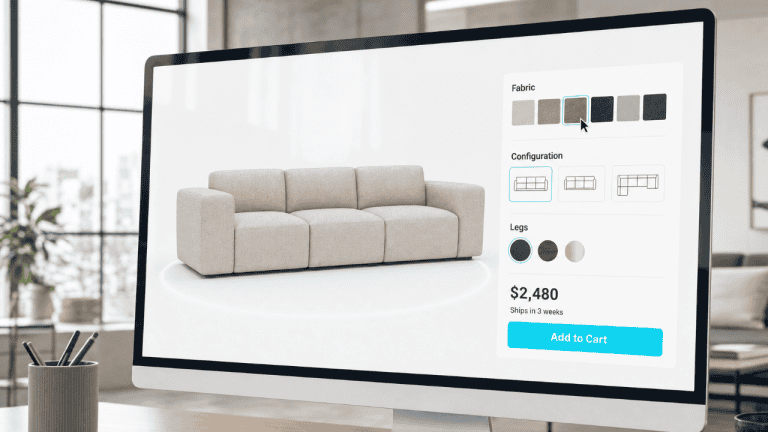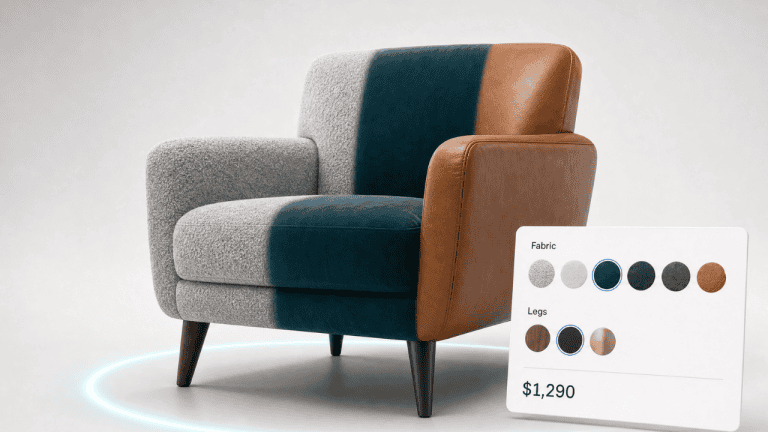
A 3D product configurator is a piece of software that lets an online shopper customize a product including changing its colour, material, size, components or finish, and see those changes rendered in real time on an interactive 3D model. Instead of choosing from a flat dropdown and hoping for the best, the buyer builds the exact product they want and views it from every angle before they add it to the basket.
For ecommerce businesses, that shift from “describe it and hope” to “see it and know” is the whole point. A configurator closes the gap between what a customer imagines and what actually arrives, and that gap is where most of the cost in online retail hides: abandoned baskets, support queries, and returns.
This guide covers what a configurator is, why it matters commercially, the features that separate a good one from a frustrating one, the industries where it pays off fastest, how it reduces returns, how the technology actually works, and how to choose a platform.
Why 3D product configurators matter for ecommerce
The core problem with selling online is simple: customers can’t pick the product up. They can’t feel the weight of it, judge the scale of it in their own room, or check that the walnut finish looks the way they pictured. That uncertainty is expensive.
A configurator addresses it directly by putting the customer in control of the product and showing them the result instantly. The commercial effects line up consistently across published research:
- Higher conversion. Shoppers who can interact with and configure a product tend to buy more often, because they’re more confident in the decision. Shopify reports that products with 3D/AR content convert at a rate around 94% higher than products without it.
- Higher order value and willingness to pay. A Deloitte study found that roughly one in five consumers who want personalisation will pay around a 20% premium for it. People value a product they’ve designed themselves.
- Fewer returns. When the product on the screen matches the product in the box, fewer orders come back. Research has linked product visualisation to meaningful reductions in return rates, particularly for considered, high-value goods.
- Lower cost-to-sell. For B2B and made-to-order businesses, a configurator can replace physical samples, printed catalogues and slow back-and-forth quoting, shortening the sales cycle.
The throughline is buyer confidence. A configurator doesn’t just decorate a product page, it removes the doubt that stops people buying and causes them to send things back.
Key features to look for in a 3D product configurator
Not all configurators are equal. When you’re evaluating options, these are the features that determine whether it actually drives results or just looks impressive in a demo:
- Real-time, photorealistic rendering. Changes to colour, material or component should update instantly and look true to life. Lag or low-quality rendering undermines the confidence you’re trying to build.
- Rule-based logic. A good configurator understands which combinations are valid, it won’t let a customer build something that can’t be manufactured, and it can hide or disable incompatible options automatically.
- Mobile-first performance. A large and growing share of ecommerce traffic is on mobile. The configurator has to be smooth on a phone, not just a desktop.
- WebAR built in. The strongest setups let the customer move from configuring in 3D to placing the finished product in their own space via augmented reality, no app download required. This is where Plattar’s combination of 3D configuration and WebAR is a natural fit.
- No-code management. Marketing and product teams should be able to update options, pricing and assets themselves, without raising a developer ticket for every change.
- Ecommerce platform integration. It needs to slot into your stack whether that’s Shopify, WooCommerce, WordPress or similar, and pass configured-product data through to the basket and order correctly.
- Pricing and quoting output. For configurable or made-to-order products, the configurator should calculate price as options change and, where relevant, generate a quote or a configured SKU.
Which industries benefit most from a 3D product configurator?
Configurators deliver the most value where products are visual, variable, considered, or hard to picture from a photo:
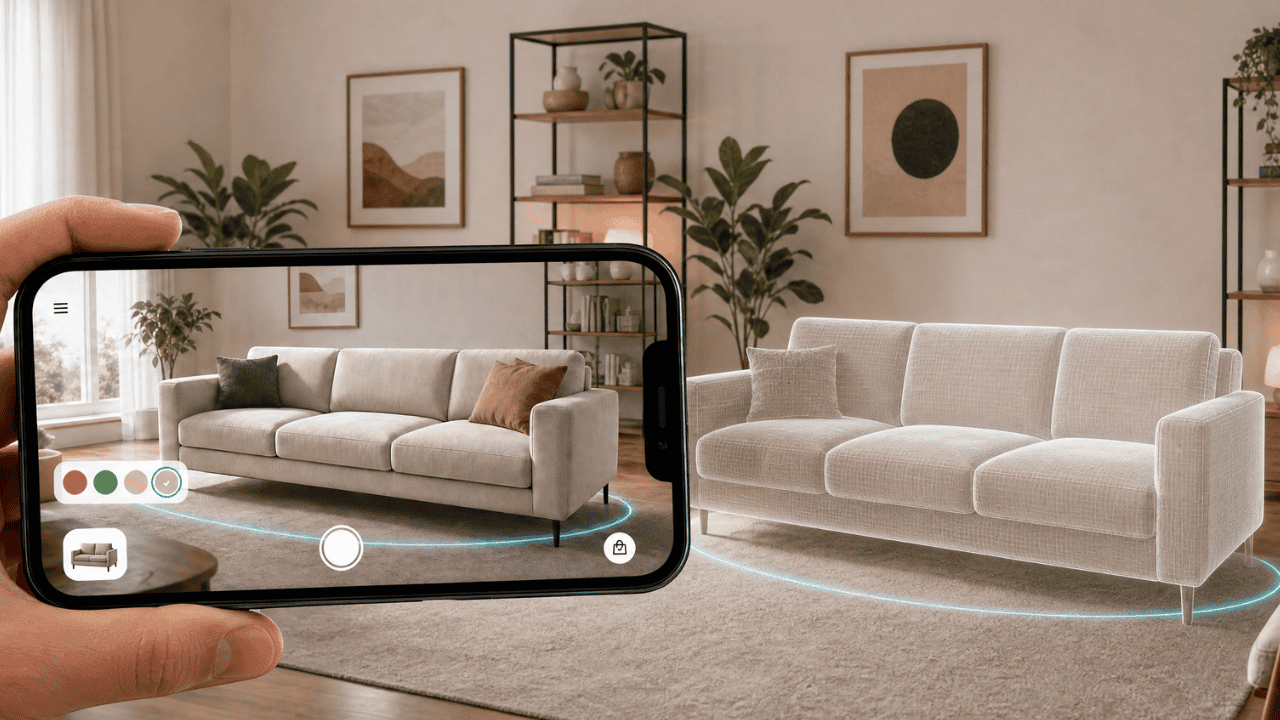
- Furniture and homeware. High-consideration, high-return categories where scale, material and finish all matter. Seeing a sofa in the right fabric, and then placing it in your own living room with AR, is exactly the use case configurators were built for.
- Industrial and B2B manufacturing. Complex, multi-option products with valid/invalid combinations, where a configurator replaces slow manual quoting and reduces specification errors.
- Automotive and powersports. The original home of configurators, building your spec, trim and colour before you buy.
- Sporting goods and equipment. Products where fit, size and component choice affect the buying decision.
- Appliances. Considered purchases where finish, dimensions and how a unit fits the space all shape the decision.
- Architectural hardware. Handles, fittings and fixtures specified across many finishes and material options.
- Modular buildings. Highly configurable structures where layout, cladding and specification vary widely from one order to the next.
- Industrial products. Multi-option equipment where accurate, visual specification helps avoid costly ordering errors.
- Home furnishings. Fabrics, finishes and sizes customers want to see in their own space before committing.
A useful rule of thumb: the higher the price, the greater the number of options, or the harder a product is to judge from a flat image, the stronger the case for a configurator.
How 3D product configurators reduce returns
Returns are one of the largest, least-discussed costs in ecommerce. A significant share of online purchases come back, and a large proportion of returns happen for a single reason: the product didn’t match the customer’s expectation.
A configurator attacks that root cause in three ways:
- Accurate expectations. The customer sees the actual configuration they’re ordering; the right colour, the right material, the right components, rather than a generic stock photo.
- True sense of scale. Paired with WebAR, the buyer can place the product in their own environment and confirm it fits before ordering. This is especially powerful for furniture and large items.
- Confident, considered choices. Interacting with a product slows the buyer down just enough to make a deliberate decision rather than an impulsive guess they later regret.
For categories like furniture, where return logistics are costly and items are bulky, even a modest reduction in return rate can have an outsized effect on margin. Across Plattar’s own deployments, customers have seen return rates fall by an average of 50%.
How does a 3D product configurator work? (The technical bit)
You don’t need to be technical to use a configurator, but understanding the moving parts helps you evaluate platforms, and it’s the kind of clear explanation that earns citations in AI search.
- 3D models. Each product is represented by a 3D model, a digital mesh with materials and textures applied. Quality here determines how realistic and trustworthy the experience feels.
- Real-time rendering engine. When a shopper changes an option, the rendering engine updates the model on the fly using the device’s graphics capabilities, typically through web technologies like WebGL so it runs in the browser with no app.
- Configuration rules. A logic layer defines which options exist, which combinations are valid, and how each choice maps to price, SKU and manufacturing data.
- WebAR layer. To view the product in the real world, the configurator hands the model to the device’s AR capabilities, anchoring it in the camera view at true scale, again, browser-based, no download.
- Ecommerce integration. The configured result, options, price and a reference the warehouse can fulfil, is passed into the cart and order system.
How Plattar does it: Plattar uses a cloud-based rendering and WebAR approach that allows interactive 3D, augmented reality, and virtual experiences to run directly in a web browser without requiring users to download an app. Experiences are delivered using modern web technologies and optimised assets to provide fast loading, broad device compatibility, and consistent performance across desktop and mobile. This browser-first architecture makes it easier for businesses to deploy immersive content at scale while simplifying updates, analytics, and integration with existing digital platforms.
How to choose a 3D product configurator platform
Once you’ve decided a configurator is right for you, use these questions to compare options:
- Does it do both 3D configuration and WebAR? Many tools do one or the other. The buyer journey is strongest when configuring and real-world placement live in the same experience.
- Is it genuinely no-code? Can your own team manage products and options, or will every change depend on a developer or the vendor?
- How well does it integrate with your platform? Confirm proper support for Shopify, WooCommerce, WordPress or whatever you run, and that configured data flows correctly into orders.
- How good is the rendering on mobile? Ask to see it on a phone, with your kind of product, not a hero demo.
- What does implementation actually involve? Some enterprise tools require heavy, lengthy integration projects. Weigh time-to-value, not just feature lists.
- Can it scale with your catalogue? A tool that’s easy for ten products may not hold up at a thousand.
This is where Plattar positions itself deliberately against heavier enterprise tools: the same depth of 3D configuration and AR, without the long, developer-dependent implementation, so teams can launch faster and manage it themselves.
Plattar’s 3D product configurator
Plattar is a no-code 3D product configurator and augmented reality (AR) platform designed for brands, retailers, manufacturers, and agencies looking to deliver interactive product experiences without extensive development resources. The platform combines real-time 3D configuration with browser-based WebAR, allowing customers to customise products online and instantly visualise them at true scale within their own environment, all without downloading a mobile app.
Using Plattar, businesses can create interactive product configurators that allow customers to select colours, materials, finishes, components, and other product variations through an intuitive interface. As shoppers make changes, the 3D model updates in real time, providing immediate visual feedback and helping customers better understand exactly what they are purchasing.
Once a configuration is complete, customers can launch an augmented reality experience directly from their mobile browser. This enables them to place the configured product into their home, office, or other real-world setting, improving purchase confidence by showing accurate size, proportion, and appearance before buying.
Because the platform is no-code, marketing, merchandising, and content teams can create, update, and manage product experiences without relying heavily on software developers. This can reduce deployment times and make it easier to keep product catalogues and configurations current as offerings evolve.
Plattar is also designed to integrate with existing digital commerce ecosystems. The platform supports connections with eCommerce platforms, content management systems (CMS), product information management (PIM) systems, enterprise resource planning (ERP) solutions, and other business applications, allowing product configuration experiences to fit within existing sales and content workflows.
- Build and deploy interactive 3D configurators without development resources
- Combine configuration with WebAR for real-world, true-scale visualisation
- Browser-based, no app download, reaching the overwhelming majority of smartphones
- Designed for content teams to manage independently
Book a demo now.
Frequently asked questions
What is a 3D product configurator?
It’s software that lets a shopper customise a product, colour, material, size, components, and see those changes on an interactive 3D model in real time, before buying.
How is a 3D product configurator different from a 2D one?
A 2D configurator swaps flat images for each option. A 3D configurator renders a true three-dimensional model the customer can rotate, zoom and (with WebAR) place in their own space, which builds far more confidence for complex or high-value products.
Do 3D product configurators increase sales?
Published research consistently links 3D and AR product experiences to higher conversion and willingness to pay. Shopify, for example, reports around a 94% higher conversion rate for products with 3D/AR content.
Can a 3D configurator reduce returns?
Yes, by helping customers order the right product the first time. Showing the exact configuration and true scale reduces the mismatch between expectation and delivery that drives many returns.
Do I need developers to add a configurator to my store?
Not with a no-code platform. Tools like Plattar are designed so marketing and product teams can build and manage configurators themselves and integrate with platforms such as Shopify, WooCommerce and WordPress.
Does a 3D configurator work on mobile?
A good one is mobile-first and runs in the browser. With WebAR, mobile is actually where it shines, because the customer can place the product in their real environment.
Which industries get the most from a configurator?
Furniture and homeware, fashion and accessories, industrial/B2B manufacturing, automotive, and sporting goods. Anywhere products are visual, customisable, high-value or hard to judge from a photo.
How long does it take to launch a 3D product configurator?
It varies by platform. Heavier enterprise tools can involve lengthy integration projects; no-code platforms are designed for much faster deployment. With Plattar, most configurators typically go live in around 2-6 weeks.
We'll build you a bespoke demo around your own website and your own range, and answer any of the questions in this post.
Request a Demo